PeopleFluent is pleased to announce the upcoming PeopleFluent Talent Management 22.11 update. This document describes the functionality of these new features, discusses their client impact, and provides detailed information about each. If you have any questions about the enhancements or the new features presented in this document, please contact your PeopleFluent representative.
Compensation Features
The features and enhancements described in this section apply to PeopleFluent Compensation. Because this application is configurable per client, new features may affect each implementation differently. For more information about any new feature, and how it can be used in specific implementations, contact a PeopleFluent representative.
These features will be available when the client is upgraded to this version of PeopleFluent Compensation.
Salary History SmartGrid Enhancement
Functionality
This enhancement adds a new column to the Salary History SmartGrid and the Salary History Data Map grid that customers can use to denote the employee's current salary.
Details
A new filterable Boolean field labeled Current has been added to the Salary History SmartGrid, allowing customers to denote which salary is the employee's current one. This allows administrators to easily filter and export this information for offline data validation. This field appears as an available column (not displayed by default) in the SmartGrid and is filterable, but not sortable.
The Salary History SmartGrid is available at:
- Primary Navigation Menu > Compensation > Salary History > By Employee.
The new field is also available in the Salary History Data Map grid, which can be found here:
- Primary Navigation Menu > Site Configuration > Data Tools > Data Map Grids > Salary Histories.
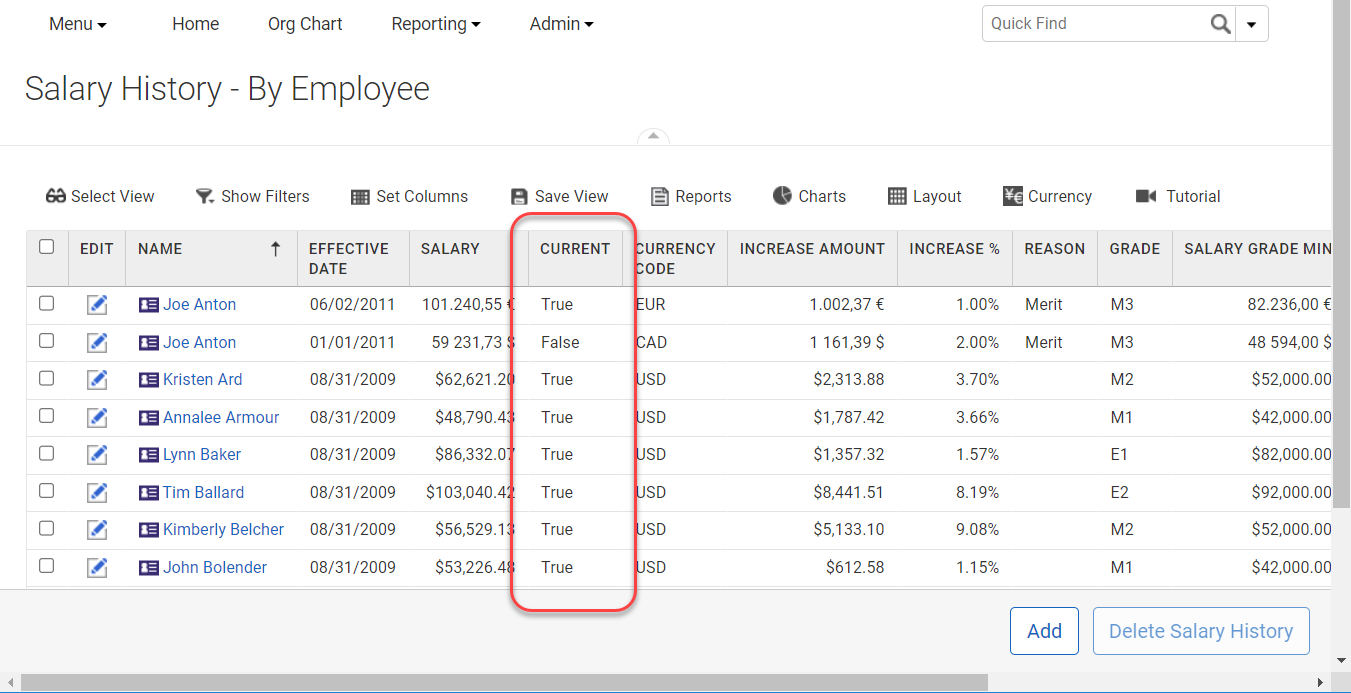
Figure: The New Current Column in the Salary History SmartGrid
- Note: Adding or deleting salary history records will not be reflected in the Current column until after the denormalization process has completed. This typically is set to run automatically at a configured interval, or it can be run manually as needed.
Compensation Statements Grid Enhancement
Functionality
This enhancement adds a time stamp to the Created Date column in the the Compensation Statements grid, and adds a new Created By column.
Details
Compensation statements can be found by going to Primary Navigation Menu > Compensation Administration > Compensation Statements.
In this update, the grid Created Date column now includes the time that the report was uploaded as well as the date. There is also a new Created By column that displays the user that uploaded the report design file.
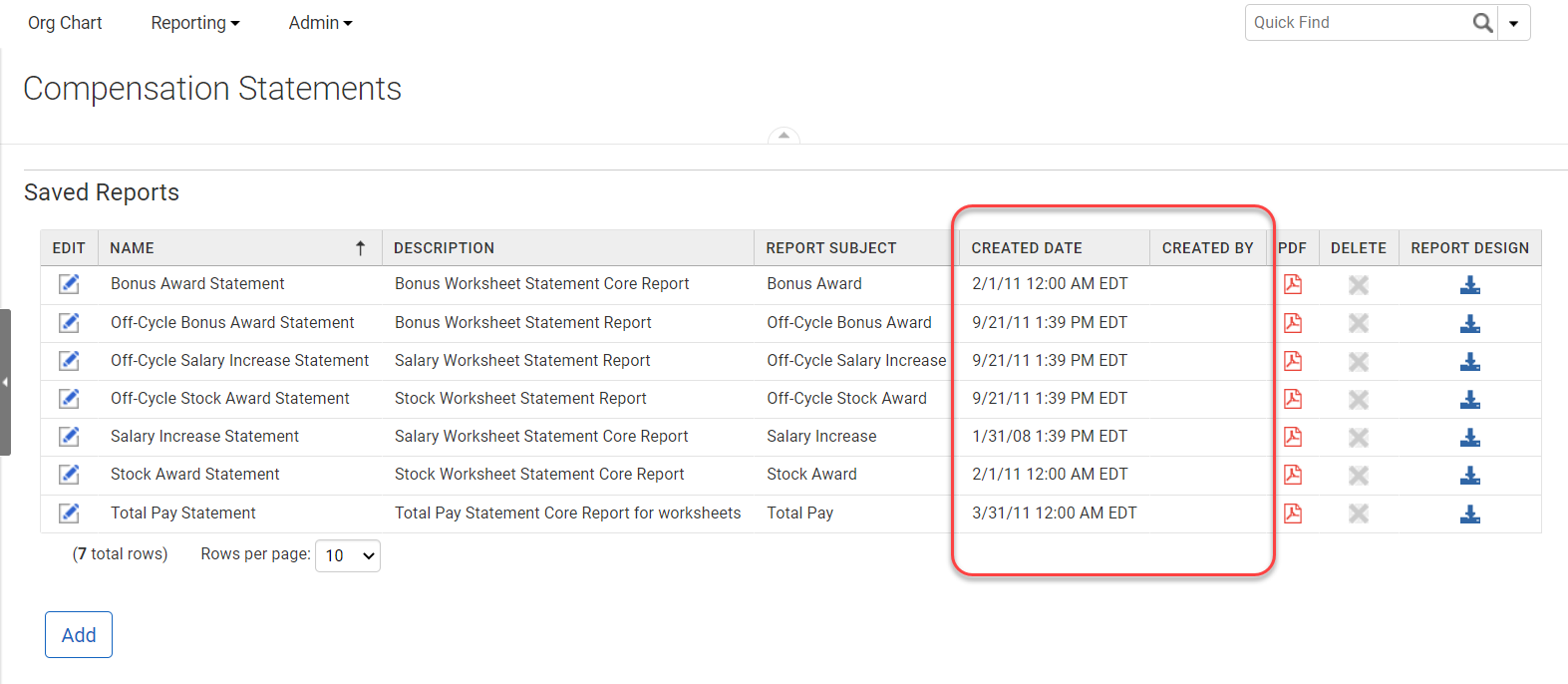
Figure: Compensation Statements Grid
- Note: For the default statements delivered out of the box, the Created By field will be blank. Also, statements uploaded in previous versions of PeopleFluent Talent Management will not have recorded Created By information, so the Created By field will be blank for those as well.
Onboarding Features
The features and enhancements described in this section apply to PeopleFluent Onboarding. Because this application is configurable per client, new features may affect each implementation differently. For more information about any new feature, and how it can be used in specific implementations, contact a PeopleFluent representative.
These features will be available when the client is upgraded to this version of PeopleFluent Onboarding.
No new PeopleFluent Onboarding-specific features or enhancements were made in this update.
Performance and Succession Features
The features and enhancements described in this section apply to PeopleFluent Performance and PeopleFluent Succession Management. Because these applications are configurable per client, new features may affect each implementation differently. For more information about any new feature, and how it can be used in specific implementations, contact a PeopleFluent representative.
These features will be available when the client is upgraded to this version of PeopleFluent Performance and PeopleFluent Succession Management.
No new PeopleFluent Performance and Succession-specific features or enhancements were made in this update.
Common Features
The features and enhancements described in this section apply to all PeopleFluent Talent Management applications. Because the applications are configurable per client, new features may affect each implementation differently. For more information about any new feature, and how it can be used in specific implementations, contact a PeopleFluent representative.
These features will be available when the client is upgraded to this version of PeopleFluent Talent Management.
New Stakeholders SmartGrid
Functionality
This enhancement adds a new SmartGrid that displays all of the stakeholders assigned to both positions and organizations in one grid.
Details
In PeopleFluent Talent Management, stakeholders can be assigned to either organizations, or to positions. Administrators can see organization stakeholders on the organization's Stakeholders page, and position stakeholders on the position's Stakeholders page.
In the 22.11 update, there is a new SmartGrid in which administrators can see both organization and position stakeholders in one grid. Standard SmartGrid sorting, filtering, views, and exporting are available in this grid.
To view the new Stakeholders SmartGrid, go to Primary Navigation Menu > Organization Data > Stakeholders.
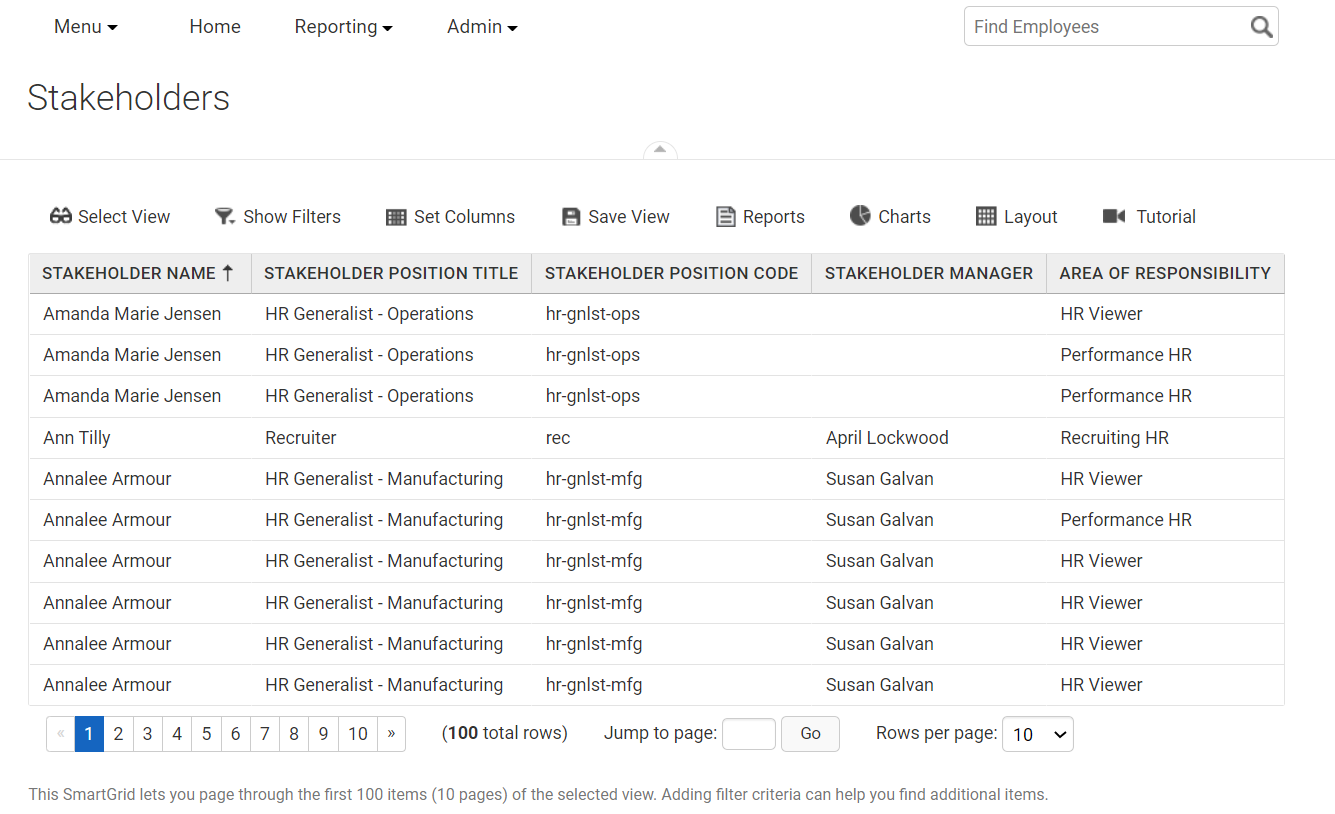
Figure: The New Stakeholders SmartGrid
- Note: You cannot add, remove, or edit stakeholder assignments on this new SmartGrid; it is here for viewing and reporting purposes only. You can add, edit, and delete stakeholder assignments when viewing the Stakeholders page on a position or organization.
In addition to the new SmartGrid, there is a new Ad Hoc report called Stakeholders Report and a new Stakeholders report subject under Organization Data when creating a new report.
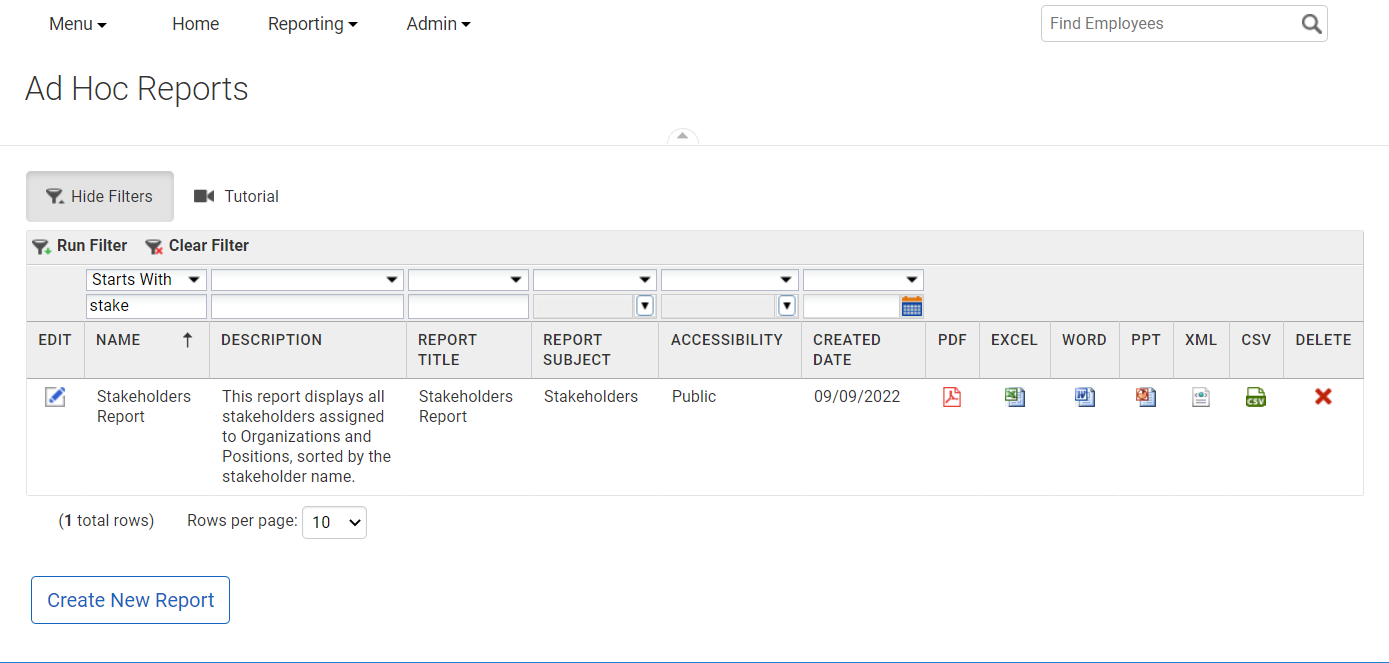
Figure: The New Ad Hoc Report
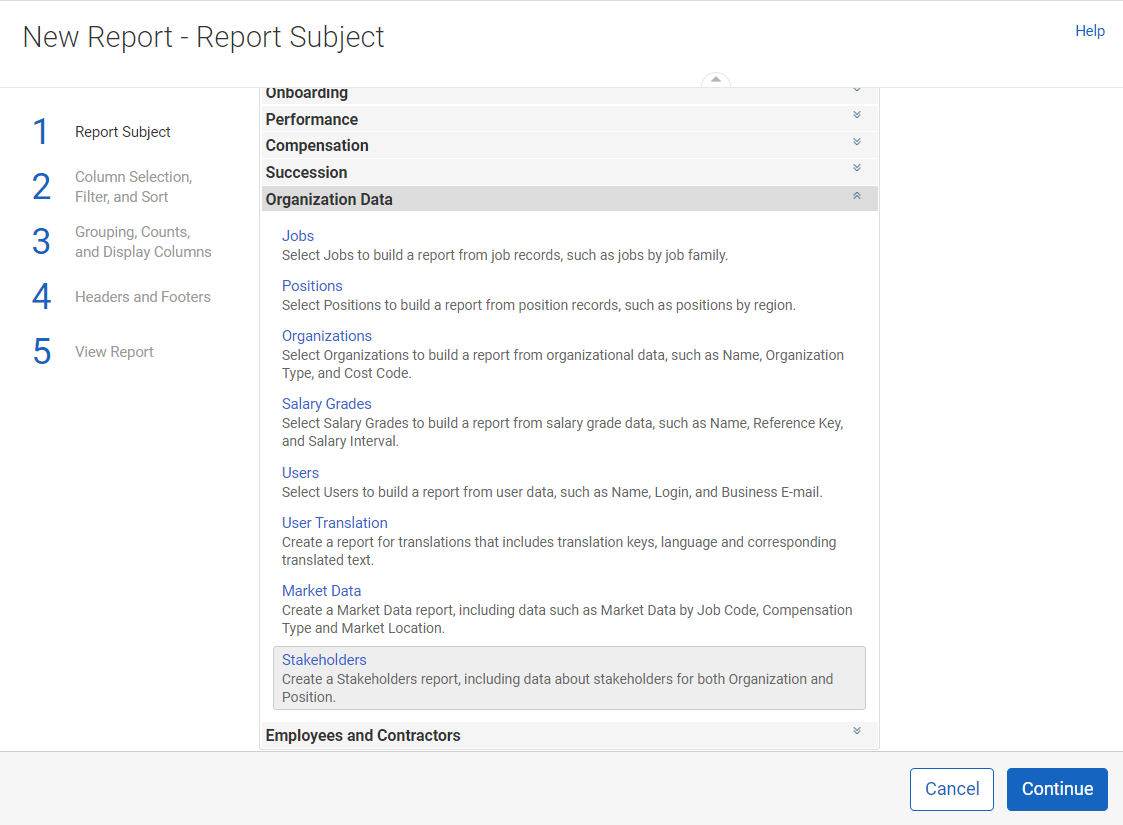
Figure: The New Report Subject
My Team Widget Optimization
Functionality
In this enhancement, the My Team dashboard widget has been optimized for faster response time.
Details
Internal performance testing revealed that requests when updating the My Team dashboard widget were sometimes timing out due to inefficiencies in the underlying code. In this update we have optimized the My Team widget performance in both the native Talent Management dashboard and in the Productivity Platform Dashboard, resulting in fewer timeouts and faster response time.
Data Feeds and APIs
This section describes changes made to data feeds and APIs. For more information on data feeds and flat files, refer to the PeopleFluent Talent Management 22.11 Control Data Guide and the PeopleFluent Talent Management 22.11 Data Mapping Guide.
Changes to Existing Data Feeds and APIs
There are no changes to the PeopleFluent Talent Management API, which remains at v1.35.220400 in this update.
Data Feeds
There are no changes to existing data feeds or APIs in this update.
New Data Feeds and APIs
This update does not include any new data feeds or APIs.
Product Documentation Changes
PeopleFluent has updated the PeopleFluent Talent Management documentation set to reflect enhancements and new features introduced in the 22.11 update.
Additional Documentation Resources
The following additional documentation resources are available:
|
Documentation |
Description |
| Hardware and Software System Requirements | Available on Customer Community. Provides information on workstation requirements, recommended and supported browsers, and supporting third-party applications. |
| Online Help | Available in the Talent Management application. Provides help content for administrators and end users. |
| Resolved Issues | Available on Customer Community. Provides information about resolved issues addressed in this update. |
| Training Manuals and eLearning Modules | Please contact your PeopleFluent representative to schedule training. |
About PeopleFluent
As a market leader in integrated talent management and learning solutions, PeopleFluent helps companies hire, develop, reward, and advance a skilled and motivated workforce. Deployed separately or as a suite, our software spans recruitment, talent mobility, performance, compensation, succession, org charting, and learning—tailored for either large or mid-enterprise organizations. We deliver unmatched functionality and flexibility, recognized by leading analysts, to develop people, drive performance and deliver results.
Our talent solutions unify talent processes within a collaborative experience that enables HR and L&D teams to guide managers and employees with contextual learning—right in the flow of work.
A part of Learning Technologies Group plc (LTG), PeopleFluent provides world-class service and an unparalleled ecosystem of partners to optimize employee experience, employer brand, and business results.
For more, visit peoplefluent.com
Legal Notices
This document has been created for authorized licensees and subscribers ("Customers") of the software products and associated services of Learning Technologies Group, Inc. by its division PeopleFluent and all of its affiliates (individually and collectively, as applicable, "PeopleFluent"). It contains the confidential and proprietary information of PeopleFluent and may be used solely in accordance with the agreement governing the use of the applicable software products and services. This document or any part thereof may not be reproduced, translated or retransmitted in any form without the written permission of PeopleFluent. The information in this document is subject to change without notice.
PEOPLEFLUENT DISCLAIMS ALL LIABILITY FOR THE USE OF THE INFORMATION CONTAINED IN THIS DOCUMENT AND MAKES NO REPRESENTATIONS OR WARRANTIES WITH RESPECT TO ITS ACCURACY OR COMPLETENESS. PEOPLEFLUENT DISCLAIMS ALL IMPLIED WARRANTIES INCLUDING THE IMPLIED WARRANTIES OF MERCHANTABILITY AND FITNESS FOR A PARTICULAR PURPOSE. PEOPLEFLUENT DOES NOT GUARANTEE THAT ITS PRODUCTS OR SERVICES OR ANY SAMPLE CONTENT CONTAINED IN ITS PRODUCTS AND SERVICES WILL CAUSE OR ENABLE CUSTOMER TO COMPLY WITH LAWS APPLICABLE TO CUSTOMER. USERS ARE RESPONSIBLE FOR COMPLIANCE WITH ALL LAWS, RULES, REGULATIONS, ORDINANCES AND CODES IN CONNECTION WITH THE USE OF THE APPLICABLE SOFTWARE PRODUCTS, INCLUDING, WITHOUT LIMITATION, LABOR AND EMPLOYMENT LAWS IN RELEVANT JURISDICTIONS. THE PEOPLEFLUENT PRODUCTS AND SAMPLE CONTENT SHOULD NOT BE CONSTRUED AS LEGAL ADVICE.
Without limiting the generality of the foregoing, PeopleFluent may from time to time link to third-party web sites in its products and/or services. Such third-party links are for demonstration purposes only, and PeopleFluent makes no representations or warranties as to the functioning of such links or the accuracy or appropriateness of the content located on such third-party sites. You are responsible for reviewing all content, including links to third-party web sites and any content that you elect to use, for accuracy and appropriateness, and compliance with applicable law.
Any trademarks included in this documentation may comprise registered trademarks of PeopleFluent in the United States and in other countries.
Microsoft, Windows, and Internet Explorer are trademarks or registered trademarks of Microsoft Corporation in the United States and/or other countries. Oracle and PeopleSoft are registered trademarks of Oracle International Corporation. Adobe and Acrobat are registered trademarks of Adobe Systems Incorporated. All other names are used for identification purposes only and are trademarks or registered trademarks of their respective owners. Portions of PeopleFluent Workforce Communication software may include technology licensed from Autonomy and are the copyright of Autonomy, Inc. Quartz Scheduler is licensed under the Apache License.
Web site: www.peoplefluent.com
Copyright © 2022, Learning Technologies Group, Inc. All Rights Reserved.
Document Version 1.0
Generated: 22.11: 2022-10-24 3:21:04 PM ET