Product:
OrgPublisher
Applicable Release:
All
Problem:
When publishing Silverlight charts, you may encounter these errors.
Solution:
| Symptom |
Fix |
| This configuration section cannot be used at this path. This happens when the section is locked at a parent level. Locking is either by default (overrideModeDefault="Deny"), or set explicitly by a location tag with overrideMode="Deny" or the legacy allowOverride="false". |
- Click "Start button"
- In the search box, enter "Turn windows features on or off"
- In the features window, Click: "Internet Information Services"
- Click: "World Wide Web Services"
- Click: "Application Development Features"
- Check (enable) the features. I checked all but CGI.
|
| *.svc missing in Handler Mappings |
- Click "Start button"
- In the search box, enter "Turn windows features on or off"
- In the features window, Click: "Internet Information Services"
- Click: "World Wide Web Services"
- Under .NET Framework 4.5 Advanced Services, expand and make sure that you have “HTTP Activation” checked:
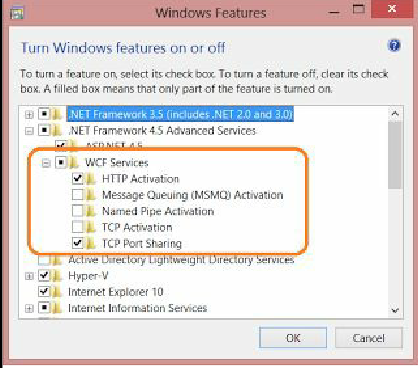
|
| Service not available |
- The Service does not exist as an IIS application
- IIS is in an error state, or is simply not running
|